











JHY PCB Blog Hub
Your Source for Expert PCB Design, Manufacturing, and Assembly Insights – Stay Informed with 2025 Trends!
How to Choose Circuit Board Software for Your Business?
Choosing Circuit Board Software is a practical business decision, not merely a technical preference. The right platform influences design accuracy, development speed, collaboration, and production costs. A small interface problem can delay an entire prototype. A missing library component can create hours of avoidable work.
Experienced engineering teams usually examine the complete design process before comparing software features. They consider schematic capture, PCB layout, simulation, component libraries, version control, and manufacturing exports. Compatibility with existing tools also matters. For example, a design team may need reliable Gerber files, clear 3D previews, and smooth collaboration between engineers and suppliers. Cloud access can support distributed teams, but it may introduce security or connectivity concerns. Offline tools offer control, yet they can complicate collaboration.
Fit matters most.
This guide explains how to evaluate Circuit Board Software against real business requirements. It considers budget, team size, learning time, technical support, file compatibility, and future growth. Independent reviews can help, but vendor claims should be tested with a trial project. Use a typical board, not a simple demonstration circuit. Measure routing time, error detection, library quality, and export reliability. Some teams focus heavily on advanced features and overlook everyday usability. That is an easy mistake. I have seen powerful tools become underused because engineers found their workflows uncomfortable. A careful evaluation should include feedback from designers, managers, and manufacturing partners. No software is perfect. The best choice is the one that supports dependable work without creating unnecessary complexity.
Define Your Business Requirements and Circuit Design Goals
How to Choose Circuit Board Software for Your Business?
Define Your Business Requirements and Circuit Design Goals
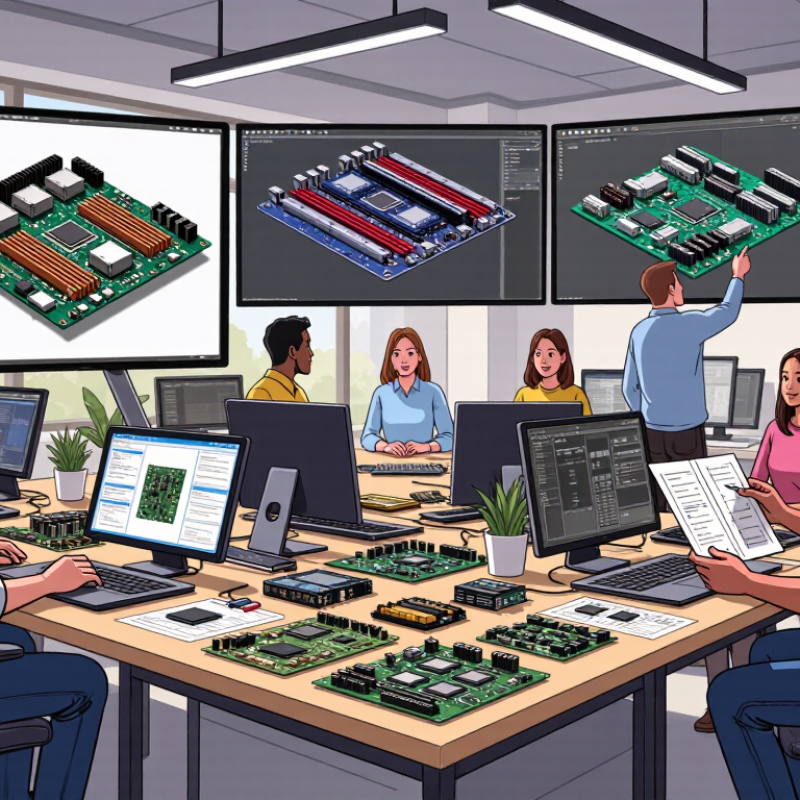
Choosing circuit board software should begin with your actual workflow, not a feature checklist. Describe the boards your team builds today. Record layer counts, component density, board dimensions, and expected production volume. A small sensor board needs different tools than a high-speed control system.
Think about the full design process. Will engineers create schematics, route traces, inspect signal behavior, and prepare manufacturing files in one environment? Confirm whether the software supports your required file formats and design rules. These details become important when a board moves from a designer’s screen to a production line.
Talk with the people who use the software daily. Ask them to test a sample project with tight spacing, curved outlines, and several power planes. Their experience may reveal hidden problems, such as slow rendering or confusing libraries. Check how easily teams can share revisions and track changes. Reliable documentation and responsive technical support also matter.
Do not pay for complexity you will never use. Yet, choosing the cheapest option can create expensive rework later. Our team once focused too heavily on advanced simulation and overlooked library management. That decision slowed a real project. A short trial with a representative board can expose similar weaknesses before your business commits. Your goals may change, so leave room for future products and staff training.
Compare Core Features of Circuit Board Software
Choosing circuit board software requires more than checking a feature list. Compare how each tool supports the complete design process, from the first schematic to manufacturing files. A reliable schematic editor should flag missing connections, unclear power paths, and conflicting component values. These checks can prevent expensive prototype revisions.
Layout capability deserves close attention. Look for clear layer management, interactive routing, design-rule checks, and accurate clearance controls. A crowded board can become difficult to inspect on a small screen. 3D viewing helps engineers examine connector height, mounting holes, and enclosure space before fabrication. It is useful, but not perfect. A visual model cannot replace careful measurements.
Simulation features should match your team's real needs. Basic electrical analysis may expose voltage drops or unstable signals. More advanced projects may require thermal review, impedance planning, or high-speed signal analysis. Compare library quality as well. Symbols, footprints, and 3D models should include verified dimensions and revision history. Shared libraries, review comments, and permission controls support dependable teamwork. Manufacturing outputs must be accurate, readable, and easy to regenerate after edits. In my experience, export errors often appear late because teams test only the design, not the production files. That assumption needs reconsideration. Also compare learning time, system performance, file compatibility, and total ownership cost. The cheapest option may consume more engineering hours. No tool wins every comparison. Choose the one that fits your board complexity, review habits, and manufacturing workflow.
How to Choose Circuit Board Software for Your Business? - Compare Core Features of Circuit Board Software
| Evaluation Dimension | Why It Matters | Essential for Most Teams | Advanced Requirement | Recommended Verification Method |
|---|---|---|---|---|
| Schematic Capture | Defines electrical connections, component references, and design intent before physical layout. | Yes | Hierarchical and multi-sheet designs | Create a multi-sheet test schematic and check net connectivity. |
| PCB Layout and Routing | Places footprints and routes copper traces while observing spacing, width, and clearance rules. | Yes | High-density and high-speed routing | Test differential pairs, length matching, blind vias, and complex layer stacks. |
| Design Rule Checking | Detects electrical and manufacturing violations before fabrication. | Yes | Custom rule classes and constraint zones | Load a manufacturer rule set and review both errors and warnings. |
| Component Library Management | Maintains symbols, footprints, 3D models, parameters, and approved component data. | Yes | Centralized libraries and approval workflows | Check revision history, access control, duplicate detection, and lifecycle fields. |
| Bill of Materials Management | Provides part numbers, quantities, values, suppliers, and manufacturing information. | Yes | Procurement and lifecycle integration | Export a BOM and confirm required fields, grouping, filtering, and revision control. |
| Manufacturing Documentation | Generates fabrication and assembly files such as Gerber, drill, pick-and-place, and assembly drawings. | Yes | Automated release packages and templates | Export a complete package and verify it against the fabricator's accepted formats. |
| Layer Stack and Impedance Planning | Supports controlled-impedance designs by defining dielectric materials, copper weights, and reference planes. | Recommended | High-speed and multilayer products | Enter a stack-up supplied by the fabricator and inspect impedance calculations. |
| 3D Board Visualization | Helps identify mechanical interference, enclosure conflicts, and incorrect component orientation. | Recommended | Detailed enclosure and thermal reviews | Import a board outline and enclosure model, then check component clearances. |
| Mechanical CAD Interoperability | Reduces mechanical-electrical coordination errors during enclosure development. | Depends on product | Products with tight mechanical constraints | Test STEP or equivalent 3D exchange and verify update handling. |
| Simulation and Analysis | Supports electrical, signal-integrity, power-integrity, thermal, or electromagnetic analysis. | Depends on product | High-speed, power, or safety-critical designs | Run a representative analysis and confirm model, solver, and export requirements. |
| Collaboration and Review | Enables comments, markups, approvals, and controlled access for distributed teams. | Recommended | Multiple locations or larger teams | Invite reviewers and test permissions, notifications, and review traceability. |
| Version Control and Change Management | Preserves design history and reduces the risk of using outdated files. | Recommended | Regulated or repeat-production environments | Create a revision, compare changes, and restore an earlier approved version. |
| Automation and Scripting | Automates repetitive checks, reporting, library updates, and data exchange. | Optional | Large portfolios or standardized workflows | Run a sample script or use an application programming interface to generate a report. |
| Data Exchange Compatibility | Ensures reliable communication with fabricators, assemblers, mechanical tools, and enterprise systems. | Yes | Automated downstream workflows | Validate Gerber, drill, ODB++, IPC-2581, STEP, CSV, and other required outputs. |
| Scalability and Performance | Determines how well the software handles larger schematics, multilayer boards, and concurrent projects. | Depends on project size | Complex products and growing design teams | Open a representative project and measure load, search, routing, and output performance. |
| Training, Support, and Total Cost | Influences adoption speed, operational continuity, maintenance effort, and long-term return on investment. | Yes | Formal onboarding and service-level commitments | Compare licensing, training, support response, migration effort, and renewal terms. |
Evaluate Usability, Collaboration, and Workflow Support
How to Choose Circuit Board Software for Your Business?
When choosing circuit board software, test usability with a real project, not a polished demo. Import a sample schematic, place components, and create a basic board layout. Watch how many clicks each task requires. Clear menus reduce training time and prevent avoidable design errors. I once selected a tool with impressive features, but new users struggled with simple edits. That experience changed my evaluation process. Speed matters, but predictable controls matter more.
Collaboration and workflow support should match your daily engineering habits. Check whether several users can review designs without overwriting changes. Version history, comments, permissions, and approval records improve accountability. The software should also connect smoothly with schematic capture, simulation, manufacturing files, and documentation. Ask whether it supports your preferred file formats. A disconnected workflow creates manual work and increases the chance of incorrect revisions. No platform feels perfect. Your team must decide which weaknesses are acceptable.
Tips: Create a short trial checklist. Ask two engineers and one production colleague to complete the same task. Compare completion time, errors, and questions. Test a late design change, such as moving a connector or changing a footprint. Notice whether everyone can understand the revision history. Record the results honestly. A familiar interface may feel comfortable, but comfort alone is weak evidence. Review security settings, technical support quality, and training resources before committing.
Check Compatibility, Scalability, and Technical Support
How to Choose Circuit Board Software for Your Business?
Compatibility should be tested on real project files, not just product pages. Check whether the software supports your operating system, component libraries, and manufacturing formats. It should import common schematic and layout files without damaging footprints or design rules. Ask about integration with simulation, documentation, and production systems. A small test board can reveal hidden problems quickly. My first evaluation missed an outdated library format. That mistake caused hours of manual corrections. A reliable trial should include your own files, not sample data.
Scalability matters when designs become larger and teams expand. Measure performance with dense boards, many layers, and extensive component libraries. Check how easily users can share projects and control design revisions. Clear permissions can prevent accidental changes to approved layouts. Also review licensing flexibility for contractors, new engineers, and remote offices. A six-person team may later become twenty. The software should grow without forcing a disruptive migration. Growth is rarely neat.
Technical support deserves practical testing before purchase. Send detailed questions about installation, file recovery, and manufacturing outputs. Note response speed and the technical depth of each reply. Helpful support should provide clear steps, not vague links. Look for searchable documentation, training materials, and regular software maintenance. Ask whether support covers urgent production issues outside normal hours. My own checklist still has gaps, especially around regional response times. That is worth revisiting before signing a long-term agreement.
Assess Pricing, Security, and Long-Term Business Value
How to Choose Circuit Board Software for Your Business?
Pricing should be measured beyond the monthly license. Check user limits, storage fees, support costs, and paid upgrades. A low entry price can become expensive after your engineering team grows. Ask for a written estimate based on your actual workflow, including design reviews and production exports. In my evaluations, unclear pricing often signals future budgeting problems. I once overlooked training time. That mistake affected our launch schedule.
Security deserves practical testing, not vague promises. Look for role-based permissions, multi-factor authentication, encryption, audit logs, and regular backups. Confirm where project files are stored and how quickly access can be removed. Request independent security reports when available. Test file recovery before trusting the platform with sensitive board layouts. Convenience is not protection.
Tips: Compare three-year costs, not only the first invoice. Ask whether your data can be exported in common formats. Review service response times and support coverage. Choose software that fits current needs but can handle more users, projects, and integrations. Long-term value depends on fewer redesigns, clearer collaboration, and dependable records. Still, no tool removes every human error. Review assumptions every quarter.
How to Choose Circuit Board Software for Your Business?
Assess Pricing, Security, and Long-Term Business Value
This practical evaluation model gives the greatest weight to security and total cost of ownership, while also considering collaboration, interoperability, and long-term support. Adjust the weighting to match your organization’s priorities.
Related Posts
-
Why Is Circuit Board Software Essential for PCB Design?
-
7 Best Circuit Board Software for Global Buyers?
-

China Top PCB Board Software Suppliers for Global Buyers?
-

Why Choose the Best Pcb Board Software for Your Projects?
-

Unlocking the Secrets of Best Pcb Board Software for Your Next Project
-

Optimize Your Designs with the Best Circuit Board Software for Efficient Prototyping