











JHY PCB Blog Hub
Your Source for Expert PCB Design, Manufacturing, and Assembly Insights – Stay Informed with 2025 Trends!
China Top Video Keypad Door Entry System Suppliers for Buyers
Choosing a China-based Video Keypad Door Entry supplier involves more than comparing prices. Buyers need to assess camera performance, keypad reliability, credential options, and integration with existing access systems. The global access control market offers useful context. MarketsandMarkets estimated its value at USD 10.4 billion in 2023 and projected USD 15.2 billion by 2028, reflecting continued investment in controlled entry. This forecast covers a broad market, not video keypad products alone.
That distinction matters. A growing market does not guarantee that every supplier offers consistent quality or dependable support. Buyers should request current product specifications, sample footage, wiring diagrams, and documented test results. Check how devices perform in low light, whether keypad inputs remain responsive, and how clearly the system records visitors. Ask about customization, firmware updates, replacement parts, and warranty terms before comparing quotations. Small details count.
Supplier evaluation also requires practical verification. Confirm the manufacturer’s production capabilities and quality-control process, then review sample units under realistic installation conditions. A useful checklist should compare resolution, viewing angle, weather resistance, storage options, and compatibility with door locks or building-management systems. Ask suppliers to explain any certifications they claim, and verify the documents independently where possible. Some details still need checking. That is normal. This guide introduces China’s Video Keypad Door Entry suppliers and outlines questions buyers can use to shortlist candidates, reduce sourcing uncertainty, and make comparisons based on evidence rather than polished catalog images.
What Is a Video Keypad Door Entry System?
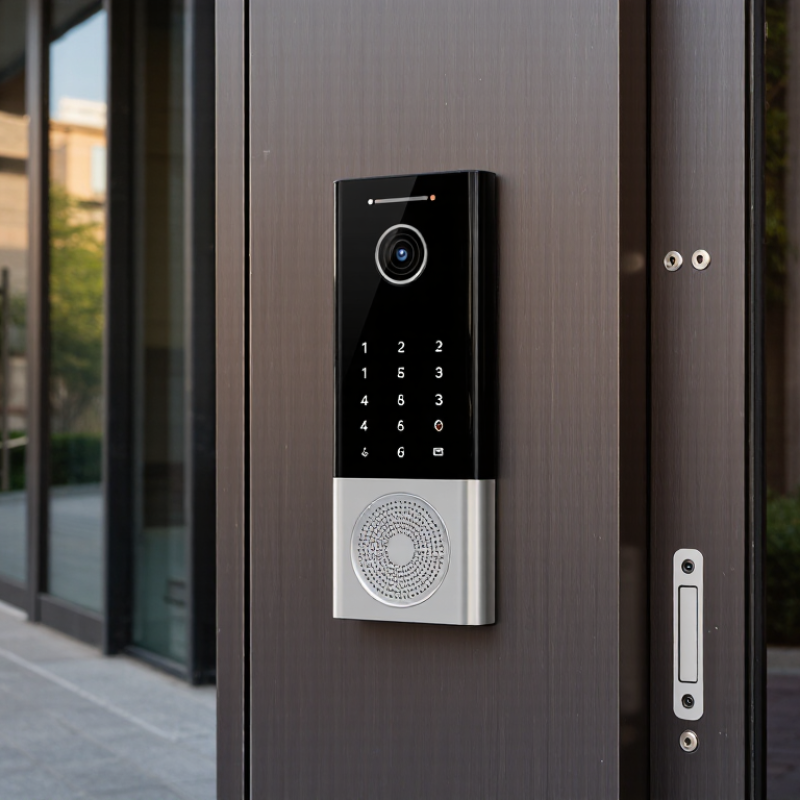
A video keypad door entry system combines a camera, microphone, keypad, and door or gate control. It lets a visitor enter a PIN or call someone from the entrance. At a front gate, the camera may show a delivery worker standing several feet away. The resident can speak through the system and, if authorized, release the lock from an indoor screen or connected device.
Details matter.
The keypad manages PIN access, while the video unit helps residents identify visitors before opening the door. Depending on the design, managers can issue individual codes and remove them when access is no longer needed. Some systems also record events, though storage and remote features vary.
A system is only as useful as its installation: poor camera angle, weak network coverage, or a weather-exposed keypad can cause everyday frustration.
One detail is easy to miss. A clear image does not guarantee clear audio, especially near a busy road.
Buyers should check power requirements, night visibility, access management, and backup operation for the specific site. There is no perfect setup; even a well-chosen system may need adjustment after people begin using it.
How Video Keypad Door Entry Systems Work
A video keypad entry system links a camera, keypad, controller, and electric lock. A visitor enters a PIN or presses a call button. The camera sends a live image to an indoor monitor or authorized phone, while the controller checks the credential. If access is approved, it signals the lock to release; otherwise, the door stays secured. Some systems process credentials locally, while others depend on a network connection. That difference matters during outages.
The controller can also record events, such as a rejected PIN or door release, giving property staff a useful audit trail. Network security deserves equal attention. NIST SP 800-57 Part 1 Rev. 5 (2020) assigns AES-128 a security strength of 128 bits; buyers should confirm whether their chosen equipment actually supports encrypted communication. The weak point can be surprisingly ordinary: a camera aimed at glare instead of the visitor’s face.
Tips: Test the keypad at night, check the camera view from a standing visitor’s height, and ask what still works if the internet fails. A clear installation plan beats an impressive feature list.
China Top Video Keypad Door Entry System Suppliers for Buyers – How Video Keypad Door Entry Systems Work
A practical, brand-neutral guide to the main components, operating sequence, and specifications buyers can compare. Values below are common examples, not guaranteed specifications; actual features vary by model and installation.
| System element or stage | How it works | Typical specifications or options | Buyer checks |
|---|---|---|---|
| 1. Visitor identification Outdoor camera and call button | The visitor presses the call button. The camera captures video and the system sends a call to an indoor monitor or compatible mobile device. | HD and 1080p cameras are common options; lens viewing angles and low-light performance vary by model. Some stations include infrared illumination. | Check resolution, viewing angle, night visibility, camera placement, and whether the stated performance is supported in the intended lighting conditions. |
| 2. Keypad credential entry PIN-based access | A resident or authorized visitor enters a programmed PIN. The controller checks the credential and, if permitted, signals the door-release relay. | Keypads may support individual or shared PINs, schedules, and administrator credentials. PIN length, user capacity, and management features are model-dependent. | Ask about user capacity, PIN reset procedures, temporary access codes, failed-attempt limits, and audit logs where required. |
| 3. Optional credentials Cards, fobs, or mobile access | If supported, a reader checks a card, fob, or mobile credential in addition to or instead of a PIN. Reader and credential technologies must be compatible. | Available options may include proximity cards, smart cards, or app-based credentials. Supported frequency, protocol, and encryption differ between systems. | Confirm the exact reader protocol and credential type before ordering; similar-looking cards are not necessarily interchangeable. |
| 4. Call and two-way communication Indoor monitor or app | The resident views the visitor and communicates through the system’s microphone and speaker. Depending on the setup, the call can be answered at a monitor or supported mobile app. | Indoor touchscreens commonly range from about 7 to 10 inches. App access, multiple monitors, and call forwarding are optional features on some systems. | Check the number of supported indoor stations, app and network requirements, audio quality, and what functions remain available during an internet outage. |
| 5. Credential decision Controller and access rules | The controller compares the entered credential with stored permissions and applies configured rules, such as authorized users or time schedules. | Credential storage, schedules, user limits, and event logging depend on the controller and software. Some systems operate locally; others rely partly on network services. | Determine where credentials are stored, who can administer them, whether events can be exported, and how access continues if a network service is unavailable. |
| 6. Door release Relay and electric lock | After an authorized PIN or resident command, a relay changes state to control a compatible electric strike, magnetic lock, or other door hardware. | Relay contact ratings and lock power requirements vary. The lock may require a separate power supply; fail-safe and fail-secure behavior depend on the lock and wiring. | Match relay ratings to the lock, verify the required power supply, and confirm the required egress and emergency-release arrangements with a qualified installer. |
| 7. Network and power System connectivity | Wired Ethernet or another supported connection links system components. Power may be supplied by a local adapter or, on compatible devices, Power over Ethernet (PoE). | PoE availability and required standard depend on the equipment. SIP, mobile access, and integration with other systems are compatibility-dependent features. | Request a wiring diagram, supported network and PoE requirements, cable-distance limits, and confirmation of interoperability with existing equipment. |
| 8. Outdoor installation Housing and environmental protection | The outdoor station is mounted near the entrance. Its enclosure and installation method help protect the device from the environment. | Some outdoor units are rated IP65 or higher, but ratings and operating-temperature ranges vary. An IP rating applies only under the stated test conditions. | Verify the documented IP rating, temperature range, mounting method, and suitability for the site’s exposure to rain, dust, and direct sunlight. |
| 9. Recording and event history Optional evidence and audit trail | Depending on the system, calls, snapshots, or access events may be recorded locally or stored through a supported network service. | Storage may use internal memory, removable media, or a network service. Capacity, retention time, and recording triggers are model- and configuration-dependent. | Confirm storage capacity, retention settings, export options, privacy requirements, and whether any cloud service requires a subscription. |
| 10. Supplier evaluation Procurement and support | Buyers compare technical fit, documentation, production consistency, and after-sales support before selecting a system or supplier. | Request a bill of materials, datasheets, wiring diagrams, sample-unit test results, warranty terms, and production lead time. Certifications are product- and market-specific. | Verify model-specific certifications with the issuing body, clarify spare-parts availability and firmware support, and test the complete system with the intended lock and network. |
Note: Confirm all specifications against the exact product datasheet and local installation requirements before purchase.
Key Components and Features Buyers Should Compare
When comparing video keypad door entry systems, examine the camera, display, keypad, and control unit together. A wide viewing angle helps show a visitor standing beside the door, not only directly in front. Ask for sample footage in dim conditions; a bright showroom image can hide poor night performance. Small details matter. Check whether the indoor screen shows clear faces and whether keypad characters remain readable in glare or rain.
Also compare keypad response, supported access methods, and the door-release interface. A system should handle repeated daily use without delayed entry or confusing prompts. Ask how it records events, stores data, and behaves during a power interruption. These details affect maintenance, so request wiring diagrams and clear instructions before ordering. For multi-unit sites, confirm that each apartment can call the correct indoor monitor. Test the setup with the intended lock and cable length, since compatibility on paper may not reflect the installed result. That part is often overlooked. It is worth admitting that no single feature settles the choice: a sharper camera may bring higher storage or network demands. Ask suppliers for a complete sample kit and written specifications, then compare the same tests across options.
Video Keypad Door Entry Systems: Resolution Benchmarks for Buyers
The bars show the approximate megapixel count calculated from each standard resolution. When comparing suppliers, also check low-light performance, keypad and credential options, weather resistance, and compatibility with your access-control system. These are resolution benchmarks, not supplier-specific product data.
Types of Video Keypad Entry System Suppliers in China
China’s video keypad entry system suppliers generally fall into several practical groups. Direct manufacturers develop and assemble complete units, including the keypad, camera, screen, and door-control interface. Some specialize in OEM or ODM projects, adapting enclosure dimensions, language settings, or wiring to a buyer’s requirements. Ask for component specifications and sample test results, not only a product catalogue.
Trading and export suppliers can coordinate several product categories and handle shipping documents, but their technical depth varies. System integrators focus on combining entry panels with indoor monitors, electric locks, and building access systems. They may offer useful wiring guidance for a small apartment block or a staffed reception area. Some suppliers specialize in components, such as low-light camera modules or weather-resistant keypads, rather than complete systems. Small details matter.
Compare suppliers by the support they can demonstrate. Request clear wiring diagrams, installation instructions, and information about spare parts and warranty handling. For outdoor units, check how the keypad responds to rain, glare, and repeated use; a neat demo indoors proves little. Confirm compatibility with the intended lock and power supply before ordering. A polished sample can still hide a weak mounting plate or unclear service process. I would not treat a low quote as a reliable measure of long-term value.
How to Evaluate and Select a Chinese Supplier
Choosing a Chinese supplier for a video keypad door entry system takes more than comparing prices. Request a current specification sheet, wiring diagram, and clear details about supported network protocols. Ask how keypad credentials are created, changed, and protected. Practical answers matter. Also check whether the supplier can provide replacement parts and technical support after delivery.
Review a sample unit before placing a large order. Test keypad response, camera clarity in dim light, and audio quality through a closed door. Test it yourself. Ask for inspection records and confirm that the sample matches the production version. A polished brochure is not proof. Discuss lead times, packaging, customization limits, and how defects are handled in writing. Vague replies may signal communication problems later.
Compare suppliers using the same questions, then check references from buyers with similar installation needs. Verify company details and production capabilities through documents and, where practical, a video factory visit. No checklist catches everything; that is an uncomfortable but useful fact. Consider a small trial order if technical fit remains uncertain. The lowest quote may exclude testing, accessories, or support, so compare the full delivered offer rather than the headline price.


