JHY PCB Blog Hub

Your Source for Expert PCB Design, Manufacturing, and Assembly Insights – Stay Informed with 2025 Trends!

What Is a Smart Door Lock Solution?

A Smart door lock solution is more than a keypad placed on a front door. It combines an electronic lock, access software, user authentication, and management tools. Depending on the property, it may support PIN codes, mobile credentials, fingerprint access, RFID cards, or temporary visitor keys. The right design should fit real routines, not merely display impressive features.

Bruce Schneier, a respected security technologist and author, offers a useful warning: “Security is a process, not a product.” That principle is especially relevant here. A reliable smart lock needs strong encryption, controlled permissions, firmware updates, and clear activity records. It should also support mechanical access or an emergency power method when batteries fail. Small details matter. A dead battery at 7:00 a.m. is not a theoretical problem.

In practice, installers should examine the door material, frame strength, network coverage, and local climate before recommending equipment. Property managers may need remote access logs, while homeowners may prefer simple family codes. Cloud dependence can improve convenience, but it may also create privacy and service-continuity concerns. No solution removes every risk. I would not describe any Smart door lock solution as completely secure, because user behavior, poor installation, and forgotten permissions still create weaknesses. A thoughtful evaluation therefore compares security, usability, maintenance, and total ownership cost. The best choice is not always the most advanced model. It is the one that remains dependable during ordinary use, unexpected outages, and changing access needs.

What Is a Smart Door Lock Solution?

Definition and Core Components of a Smart Door Lock Solution

What Is a Smart Door Lock Solution?

A smart door lock solution is an access system that replaces or supports a traditional key. It combines electronic locking hardware, identity verification, software, and communication tools. Users may unlock a door with a code, mobile credential, fingerprint, card, or approved remote command. The solution can record entry events and show who accessed a space and when. In real installations, convenience matters, but reliability matters more. A lock that looks advanced is not useful if residents cannot enter during a power or network failure.

Definition and Core Components of a Smart Door Lock Solution

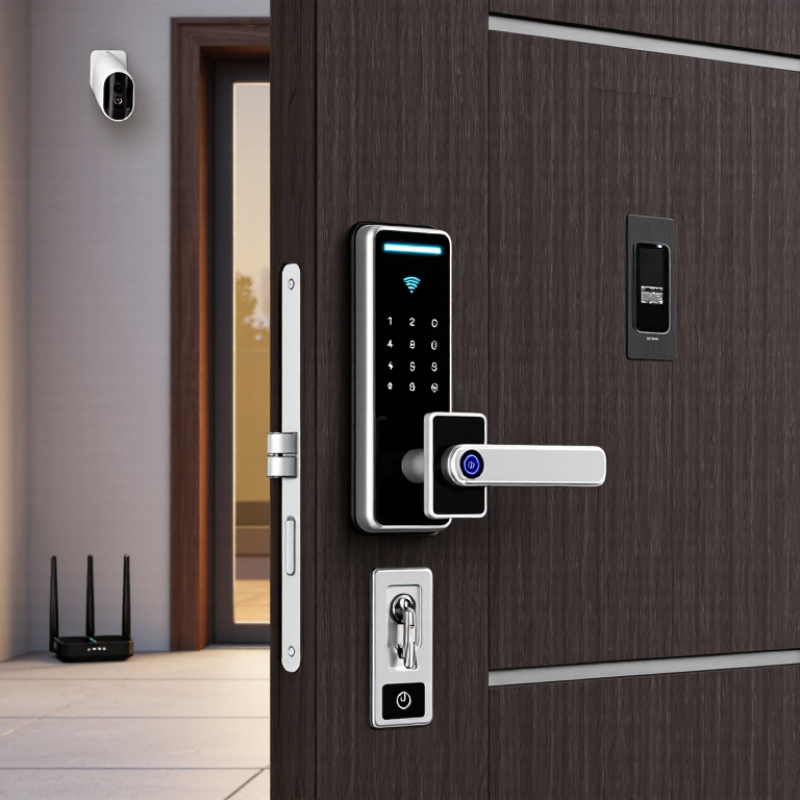
The lock body provides physical security and controls the latch or deadbolt. An authentication module checks a user’s credential before access is granted. This module may include a keypad, biometric reader, card reader, or mobile interface. A control unit manages permissions, schedules, alerts, and activity records. Communication may use Bluetooth, Wi-Fi, cellular networks, or a local gateway. Power comes from batteries, wired electricity, or both. Mechanical override access is also important for emergencies and maintenance. These parts must work together, not merely perform well alone. Poor installation, weak batteries, or unclear permissions can still create serious access problems.

How Smart Door Lock Solutions Authenticate and Control Access

What Is a Smart Door Lock Solution?

How Smart Door Lock Solutions Authenticate and Control Access

A smart door lock solution combines a lock, access credentials, sensors, and management software. It verifies identity before releasing the bolt. Credentials may include a mobile code, fingerprint, PIN, keycard, or temporary digital key. Each method has limits. A fingerprint can fail with wet hands, while a PIN may be exposed near a keypad.

Authentication usually happens through several checks. The lock confirms the credential, checks its permission, and records the event. A schedule can allow a cleaner to enter from 9:00 to 11:00 a.m. An administrator can remove access immediately after a contract ends. Some systems also require a second factor, such as a phone confirmation, for sensitive areas.

Access control depends on careful configuration. Roles should match real responsibilities, not convenience. Sensors can report whether the door is open, closed, or forced. Alerts may identify repeated failed attempts or unusual entry times. During installation, I would test the lock with weak connectivity, low battery power, and an incorrect code. This practical check matters. A system that works only in ideal conditions is not reliable enough.

Privacy also requires attention. Access logs should be limited to authorized staff and protected with strong security practices. Regular firmware updates, battery checks, and emergency procedures improve resilience. Still, no smart lock is perfect. A rushed setup, forgotten administrator account, or poor user training can weaken the entire design.

What Is a Smart Door Lock Solution? - How Smart Door Lock Solutions Authenticate and Control Access
Solution Dimension Authentication or Control Method How It Works Typical Use Case Security and Operational Considerations
PIN Authentication Numeric code Users enter a predefined or time-limited code on a keypad. The lock validates the code locally or through a connected access-management system. Homes, rental properties, offices, utility rooms, and shared facilities. Unique codes should be assigned to individuals or groups. Repeated failed attempts can trigger temporary lockout or alerts. Codes should not be reused across sites.
Mobile Credential Bluetooth or app A smartphone communicates with the lock through Bluetooth Low Energy or an application. The user is granted, denied, or scheduled access according to stored permissions. Residential access, workplace entry, property management, and service personnel access. Access depends on phone security, credential protection, battery status, and the lock’s offline behavior. Permissions can usually be revoked without changing the physical lock.
Near-Field Credential NFC or contactless card A card, key fob, or compatible mobile device is presented near the reader. The lock checks the credential against an authorized list. Hotels, offices, campuses, multi-tenant buildings, and controlled internal areas. Lost credentials should be disabled promptly. Secure credential technology and protected key management help reduce cloning and unauthorized duplication risks.
Biometric Authentication Fingerprint or facial recognition The reader compares a captured biometric characteristic with an enrolled template and unlocks the door when the match meets the configured threshold. Private residences, restricted rooms, laboratories, and areas requiring hands-free access. Biometric systems must address false acceptance and false rejection. Biometric templates should be protected, and an alternative credential should be available for failed reads or accessibility needs.
Mechanical Key Physical key override A conventional key cylinder provides a non-electronic method of operating the locking mechanism when electronic authentication is unavailable. Emergency entry, battery depletion, maintenance access, and backup operation. Key control remains important. Restricted key systems, secure storage, and documented issuance procedures help reduce unauthorized physical access.
Remote Access Management Cloud or gateway control An administrator uses a web portal or application to create, modify, schedule, or revoke credentials and review access events remotely. Distributed properties, rental units, commercial facilities, and multi-site operations. Internet availability, administrator account security, encryption, role-based permissions, and service availability affect remote-control reliability.
Offline Authorization Local decision-making The lock stores authorized credentials, schedules, and rules locally, allowing it to make access decisions without a continuous internet connection. Homes and facilities with unreliable internet or strict local-processing requirements. Remote changes may not take effect until the lock synchronizes. Local storage capacity, clock accuracy, and update procedures should be considered.
Connectivity Bluetooth, Wi-Fi, Zigbee, or Z-Wave Wireless communication links the lock to a phone, hub, gateway, building system, or internet service, depending on the selected architecture. Smart homes, access-control systems, property portfolios, and integrated building management. Each protocol has different requirements for range, power consumption, network dependence, interoperability, and security configuration. Wireless communication should use current supported security settings.
Access Scheduling Time-based permissions Credentials are configured for permanent, recurring, or one-time access within defined dates and times. Housekeeping, contractors, caregivers, deliveries, offices, and short-term occupancy. Schedules should account for time zones, daylight-saving changes, clock drift, and the difference between an issued credential and an actually used credential.
Audit Trail Event logging The system records events such as successful unlocks, denied attempts, credential changes, battery warnings, and forced-entry alerts when supported. Security monitoring, compliance reviews, incident investigation, and occupancy management. Logs should include reliable timestamps and user or credential identifiers. Retention, access permissions, and privacy requirements should be defined before deployment.
Power Management Battery or wired power Battery-powered locks use low-power electronics and provide status notifications or local warnings as energy decreases. Wired systems may use building power with backup support. Residential doors, offices, hospitality spaces, and controlled internal doors. Battery life varies with lock design, communication frequency, temperature, traffic, and battery quality. A low-battery alert and a documented replacement process are essential.
Door-State Monitoring Position and lock sensors Magnetic or integrated sensors report whether the door is open, closed, locked, or unlocked, depending on the hardware configuration. Security-sensitive rooms, offices, storage areas, and automated building workflows. Sensor alignment and installation quality affect accuracy. Door-state information should be treated as a security signal, not as a substitute for physical inspection in emergencies.
Tamper Detection Alerts and alarms The lock or connected system can detect selected events such as repeated failed credentials, enclosure tampering, forced rotation, or unusual access behavior. Commercial facilities, restricted areas, and properties requiring security notifications. Alerts should be prioritized to avoid alarm fatigue. Detection capability depends on the hardware, installation, configuration, and integration with monitoring systems.
Emergency Operation Override and fail mode An emergency procedure may use a mechanical key, external power contact, administrative credential, or designated life-safety integration. Residential buildings, workplaces, healthcare environments, and emergency-response scenarios. Fail-safe and fail-secure behavior have different safety implications. The selected mode must comply with applicable fire, building, accessibility, and emergency-egress requirements.
System Integration API or building platform The lock exchanges credentials, events, schedules, or status data with property-management, identity, visitor-management, or building-automation systems. Enterprise facilities, residential portfolios, hospitality, and multi-system access environments. Integration should use authenticated interfaces, least-privilege permissions, documented data flows, and a defined process for software updates and access revocation.

Note: Actual features, compatibility, battery life, security controls, and emergency behavior vary by lock design, installation, configuration, and applicable local regulations.

Key Technologies Used in Smart Door Lock Systems

What Is a Smart Door Lock Solution?

A smart door lock solution combines electronic locking hardware, sensors, software, and secure access methods. Its core technology is identity verification. Users may unlock doors with a PIN, fingerprint, mobile credential, or temporary digital key. Fingerprint readers are convenient, but wet or dusty fingers can cause failed scans. PIN access remains useful, although weak codes create avoidable risks.

Connectivity controls how the lock communicates. Bluetooth supports nearby phone access with low power use. Wi-Fi enables remote management, alerts, and activity records. Some systems use a local hub or another wireless protocol to reduce direct internet exposure. Strong encryption should protect credentials during storage and transmission. Door-position sensors also matter. They can report whether the door is open, closed, or forced. In practical testing, battery warnings and offline access often deserve more attention than attractive app features.

Tips: Choose a lock with emergency power support, clear battery alerts, and mechanical backup access. Test it with wet hands, weak signals, and a dead phone. Review permission settings regularly. Temporary access should have an expiration time and a recorded user. Cloud control can be convenient, but local operation is worth considering during network outages. No system is perfect. A reliable solution combines several safeguards rather than trusting one technology.

Benefits and Practical Applications of Smart Door Lock Solutions

A smart door lock solution combines an electronic lock, access controls, and a management system. It may use a keypad, mobile app, fingerprint reader, or access card. The aim is simple: control entry without relying on traditional keys. In practice, users can unlock a door remotely, review entry records, and create time-limited permissions. No key exchange is needed.

The benefits become clearer in daily situations. Homeowners can give cleaners or guests temporary access without sharing a permanent code. Small offices can assign permissions by role and remove them when staff leave. Rental properties may support scheduled access for visitors, maintenance workers, or new tenants. Care facilities can help authorized caregivers enter at agreed times. That matters. Access logs also help managers investigate missed appointments or unusual activity.

A dependable solution needs more than attractive features. Battery warnings, emergency power options, strong encryption, and manual backup access deserve careful planning. Batteries fail. Internet connections also stop working. Real-world testing often reveals these overlooked weaknesses. Users should understand who can view access records and how long those records remain stored. Installation must fit the door frame, fire-safety requirements, and local privacy rules. The weak point is often human behavior, not the lock itself. Staff may share codes, ignore alerts, or forget permission updates. Clear policies and regular checks make the system safer and more practical.

Security, Privacy, and Maintenance Considerations

A smart door lock solution combines electronic access, mobile control, activity records, and a physical locking mechanism. Security depends on more than strong encryption. The 2024 Data Breach Investigations Report examined over 30,000 security incidents and found that human involvement appeared in 68% of breaches. Shared passwords, careless permissions, and unprotected phones can weaken an otherwise capable lock. Use unique credentials, multi-factor authentication, and automatic updates. Keep one trusted administrator.

Privacy requires equal attention. A lock may record entry times, user identities, device details, and remote commands. These records can reveal household routines. The NIST Privacy Framework recommends data minimization, clear purpose, and controlled retention. Store only necessary logs, limit administrator access, and delete old records on a fixed schedule. Local processing can reduce exposure, although it may limit convenience. Privacy settings are often confusing. That deserves improvement.

Maintenance is practical, not optional. Test batteries before warning levels become urgent, especially during cold weather. Keep a mechanical key or approved backup method available. Check the strike plate, screws, and door alignment every few months. A misaligned door can make the motor work harder and drain batteries faster. Review access permissions after a tenant, employee, or family member leaves. The 2024 State of Operational Technology and Cybersecurity Report noted that unpatched systems remain a persistent risk across connected environments. Firmware updates matter, but updates can occasionally create compatibility problems. Record changes, test access, and question convenience when it conflicts with control.

Article Source:

Scroll to Top