











2026 Best Smart Whiteboard for Global Buyers?
Choosing the 2026 Best Smart Whiteboard for Global Buyers requires more than comparing screen size and price. A reliable Smart Whiteboard must perform in real classrooms, meeting rooms, and training centers. It should respond smoothly to wet or dry hands, display clear text under bright lights, and support common video platforms. Small details matter.
Nancy Knowlton, co-founder of SMART Technologies, captured the central principle: “Technology should enhance learning, not replace it.” This idea guides our evaluation. We examine touch latency, annotation tools, operating systems, microphones, cameras, connectivity, software updates, and compatibility with Windows, Android, and cloud platforms. We also consider installation, warranty support, language options, and regional service availability. Global buyers need confidence after delivery, not only an impressive product page.
Our comparison will highlight models suited to different budgets and working environments. Some offer excellent collaboration features but limited local support. Others provide strong hardware but confusing software. A bright display may still create glare. A lower-priced model may become expensive after mounting, shipping, or training costs. No ranking can be perfect. Buyer needs differ widely.
This guide combines technical specifications with practical purchasing experience. It explains what manufacturers often advertise, what users should verify, and which weaknesses deserve attention. We will not treat every advanced feature as valuable. Sometimes, a simple interface wins. The best Smart Whiteboard is the one people can use confidently every day, across borders, languages, and changing work habits.
What Is a Smart Whiteboard and Why Does It Matter in 2026?
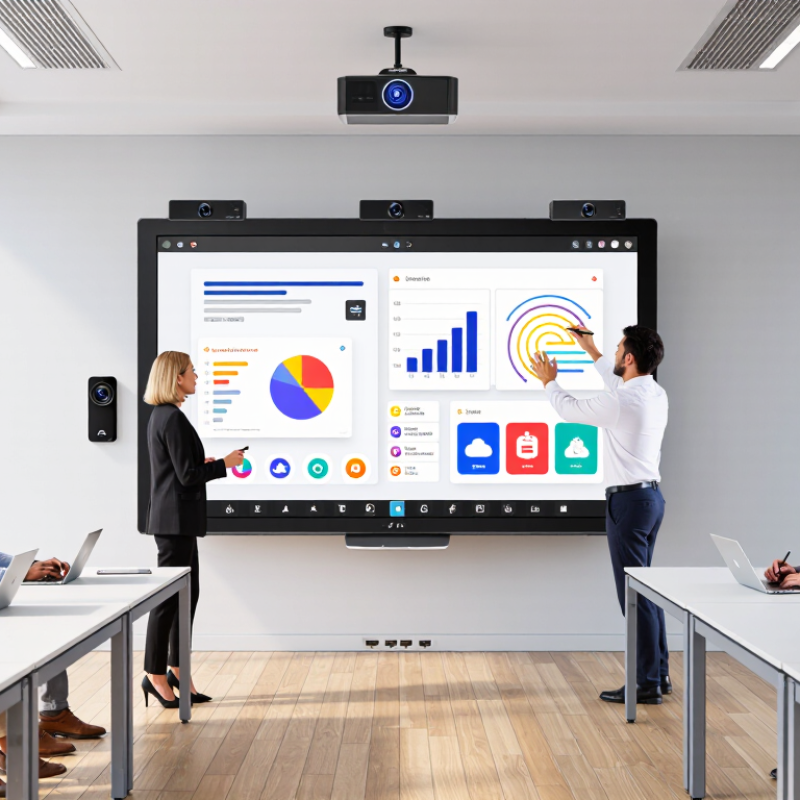
In 2026, a smart whiteboard is more than a large touchscreen. It combines digital writing, wireless sharing, cloud access, cameras, microphones, and searchable notes. Some models also convert handwriting into editable text. This changes a meeting room into a shared workspace. Remote participants can see the same canvas, not a blurred camera view. That detail matters during product reviews, lessons, and international planning sessions.
Market demand is growing, but buyers should examine the evidence carefully. A 2024 MarketsandMarkets report projects the interactive whiteboard market to grow from about 4.6 billion dollars in 2023 to 8.2 billion dollars by 2028. The report estimates a compound annual growth rate above 12 percent. Meanwhile, a 2024 global workplace study by a leading technology research firm found that hybrid collaboration remains a major investment priority. These figures support adoption, yet they do not guarantee useful outcomes. A bright display cannot repair unclear meeting habits. This is where many purchasing decisions become too optimistic.
Tips: Test handwriting accuracy with different users and lighting conditions. Check whether guests can join without complex accounts. Measure startup time, speaker clarity, and annotation lag. Confirm data controls, software updates, and accessibility features. Ask staff to complete a real thirty-minute meeting before approval. Small weaknesses appear quickly. Sometimes, the simplest interface wins. A buyer should also calculate total ownership costs, including installation, training, support, and replacement parts. That broader view is less exciting, but usually more reliable.
| Evaluation Dimension | Typical 2026 Benchmark | Why It Matters to Global Buyers | Recommended Buying Check |
|---|---|---|---|
| Display Size | Common sizes range from 55 to 86 inches. A 65-inch screen generally suits small meeting rooms, while 75 to 86 inches is more suitable for classrooms, training rooms, and larger conference spaces. | The correct size improves readability from the back of the room and reduces the need for participants to move closer to the display. | Room-size dependent Measure viewing distance, wall width, doorway access, and installation height before ordering. |
| Resolution | 4K UHD, or 3,840 × 2,160 pixels, is the practical premium standard for large interactive displays. Full HD may still appear in smaller or budget-focused products. | Higher resolution makes handwriting, spreadsheets, diagrams, video, and small text easier to read. | Choose 4K for screens above approximately 65 inches or for detailed professional content. |
| Touch Technology | Infrared or projected-capacitive touch systems are common. Many professional models support approximately 10 to 40 simultaneous touch points, depending on operating system and software. | Multi-touch enables several users to write, move objects, zoom, and annotate at the same time. | Test simultaneous writing with different pen sizes, hands, gloves, and erasers instead of relying only on the advertised touch-point count. |
| Writing Latency | Low-latency digital ink is generally expected for professional use. A responsive experience should feel close to writing on a physical board, although actual performance varies by pen, software, and input source. | Visible delay can interrupt teaching, brainstorming, annotation, and presenter flow. | Request a live demonstration and test writing at the corners, edges, and center of the screen. |
| Operating System | Most smart displays combine a built-in operating environment with support for external computers through HDMI, USB, or USB-C. Some systems also support desktop operating systems through an optional computing module. | Flexible operating-system support helps international teams use existing productivity, education, video-conferencing, and collaboration software. | Confirm application compatibility, update policy, language support, administrator controls, and whether software subscriptions are required. |
| Wireless Connectivity | Wi-Fi 5 or Wi-Fi 6 is common, with Bluetooth support on many models. Wired Ethernet remains important for stable enterprise and education deployments. | Reliable connectivity supports screen sharing, cloud synchronization, remote management, and online meetings. | Check support for the local 2.4 GHz and 5 GHz bands, enterprise authentication, captive portals, and regional wireless regulations. |
| Wired Connectivity | Typical interfaces include HDMI input, USB-A, USB-C, audio output, and Ethernet. USB-C may provide video, touch return, data, and charging through a single cable when full-featured. | Broad connectivity reduces setup time and makes the display useful with laptops, document cameras, media players, and conference equipment. | Verify the exact USB-C functions, supported video resolutions, port quantity, cable length, and compatibility with common laptops. |
| Wireless Screen Sharing | Common functions include casting from laptops, tablets, and smartphones, with support varying by operating system and network configuration. | Participants can present without repeatedly changing cables, which is valuable for hybrid meetings and international collaboration. | Check whether sharing requires an app, whether guest access is supported, and whether content is encrypted during transmission. |
| Built-in Audio and Camera | Integrated speakers are common. Some professional displays include microphones and cameras, while others require separate video-conferencing equipment. | Integrated components can simplify installation, but audio pickup and camera framing strongly affect remote-meeting quality. | Evaluate microphone pickup distance, echo cancellation, camera field of view, privacy shutters, and compatibility with the chosen meeting platform. |
| Collaboration and Annotation | Useful software commonly includes infinite canvas functions, handwriting conversion, shape recognition, page organization, image insertion, QR-based sharing, and export to PDF or image formats. | These tools convert board work into reusable digital content instead of leaving ideas inaccessible after a meeting or lesson. | Test save, export, undo history, template support, offline use, and simultaneous editing by remote participants. |
| Cloud and File Compatibility | Professional workflows generally require support for common formats such as PDF, PNG, JPEG, Microsoft Office files, and standard web content. | Format compatibility helps international users work across different schools, departments, devices, and cloud platforms. | Confirm import and export fidelity, font handling, file-size limits, account regions, and whether cloud storage is optional or mandatory. |
| Security and Privacy | Important controls may include user authentication, screen-lock settings, encrypted connections, secure boot, application permissions, data wiping, and centralized device management. | Boards may display confidential business, student, customer, or government information. | Look for documented security updates, administrator roles, audit options, factory-reset controls, camera and microphone privacy settings, and compliance documentation where required. |
| Accessibility | Useful features include adjustable text size, high-contrast interfaces, screen-height flexibility, clear audio output, caption support, and support for multiple input methods. | Accessibility improves participation for users with visual, hearing, mobility, or language-related needs. | Assess the user interface against applicable accessibility policies and test the display from seated and standing positions. |
| Energy and Operating Cost | Energy use depends on screen size, brightness, operating hours, standby settings, and connected equipment. Automatic sleep and power scheduling are common efficiency features. | Electricity, software licenses, replacement pens, installation, and support can materially affect total cost of ownership. | Request typical and maximum power consumption, standby consumption, energy labels, license fees, and expected service intervals. |
| Installation and Mounting | Products may support wall mounting, mobile carts, or height-adjustable stands. Large displays require suitable wall strength, ventilation clearance, and safe handling equipment. | Installation conditions differ significantly across countries, buildings, electrical systems, and accessibility requirements. | Confirm mounting standards, display weight, wall load rating, power-plug type, voltage range, local installation support, and delivery access. |
| Durability and Maintenance | Commercial-grade products typically offer reinforced glass, continuous-use ratings, replaceable accessories, and diagnostic tools, but durability claims should be verified in product documentation. | Frequent classroom and meeting-room use makes surface wear, port damage, software stability, and repair availability important. | Ask about surface hardness, anti-glare treatment, cleaning instructions, spare-part availability, repair procedures, and expected service life. |
| Warranty and Regional Support | Warranty length, on-site service, replacement-part availability, response time, and supported countries vary widely by supplier and sales channel. | International buyers need predictable support after installation, especially when displays are deployed across multiple regions. | Compare warranty coverage, local service partners, return logistics, language support, firmware update responsibility, and escalation procedures. |
| Best-Fit Use Case | For small rooms, prioritize size efficiency and video-conferencing integration. For classrooms, prioritize multi-touch, durability, accessibility, and simple lesson sharing. For enterprises, prioritize security, device management, interoperability, and service coverage. | There is no single best smart whiteboard for every buyer; the best choice is the one that matches room size, workflow, network policy, and support requirements. | Best overall approach Score each shortlisted display against the same technical, operational, security, and total-cost criteria. |